
Infected computer? We will clean it up and give you peace of mind
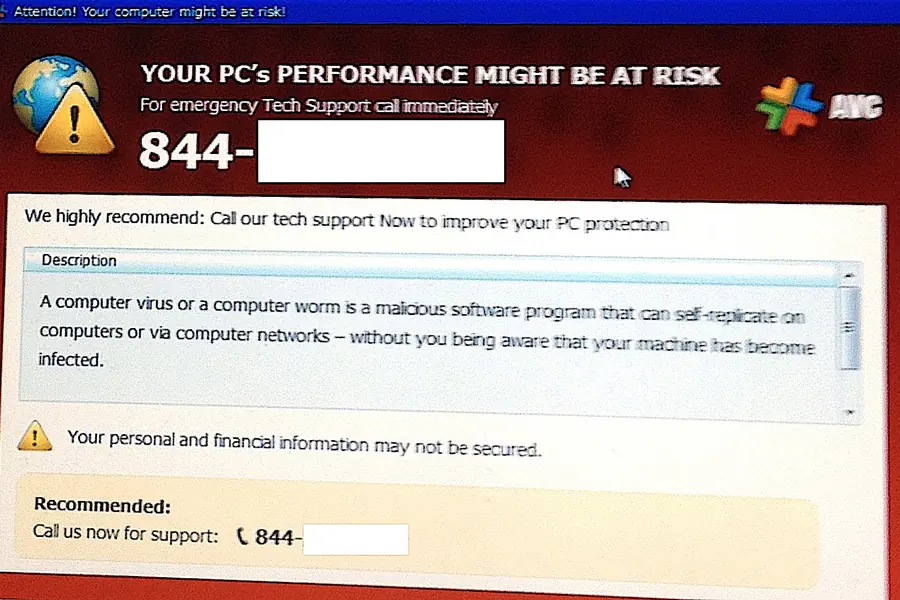
Is your computer suddenly running slowly, opening ads on its own, changing your browser homepage or showing strange messages? In most cases the culprit is malicious software. The good news is that almost every infected computer can be cleaned up and restored to working order, often without any loss of data.
How to recognise that your computer is infected
- Sudden slowdown and overheating, even when you are not doing anything demanding.
- Pop-up ads and redirects to unfamiliar websites.
- A changed homepage or a new search engine you did not set up.
- Unknown programs or browser extensions that appeared on their own.
- Locked files with a demand for payment (this is ransomware and you need to act fast).
- Your antivirus is disabled or cannot be turned on.
What not to do
- Do not pay any ransom or “fines” that pop up on your screen. They are scams.
- Do not enter passwords or card details until the computer has been cleaned.
- Do not install more “cleaning” programs from the internet, as they are often part of the problem themselves.
- If important data is involved and you suspect ransomware, stop working with the computer and contact us.
What you can do yourself while there is time
If it is an ordinary adware infection (not ransomware), these steps often help:
- Disconnect the computer from the network (unplug the cable or turn off WiFi), so the malicious software cannot send data or spread further.
- Run a scan in safe mode. In it only the bare minimum starts, and a lot of malicious software does not activate, so it is easier to remove.
- Scan with two tools - a classic antivirus and additionally Malwarebytes, which is good at catching adware and fraudulent software.
- If you suspect ransomware, do not delete or reinstall anything. Some kinds can be decrypted, and rushed steps lower the chance of saving your data.
If you are unsure or the infection persists, contact us before you cause more damage.
How we clean your computer
We work thoroughly and safely:
- Diagnostics and identification of exactly what attacked the computer.
- Removal of viruses, malware, spyware and adware, including the hidden parts that a regular antivirus overlooks.
- Cleaning the browser of fraudulent extensions and redirects.
- Updating the system and its security, so the problem does not come back.
- In extreme cases, a clean reinstall of the system with a backup of your data.
After the service, we hand the computer back to you fast, clean and protected, along with advice on how to avoid an infection next time.
How to avoid an infection next time
Prevention is always cheaper than rescue:
- Update your system and programs, because postponed updates are the most common hole.
- Download only from trusted sources and do not click attachments and links in unknown emails.
- Keep a working antivirus and the firewall on.
- Back up your data regularly. With ransomware, a clean backup is often the only sure way back.
We take care of your computer and laptop
Whether it is a computer or a laptop, at home or in a business, we will safely remove the infection and secure it. If you are not sure whether something is wrong, it is better to get in touch and let us take a look. Better to check once than to lose your data.
Infected computer? We will sort it out
We safely remove viruses and malware from computers and laptops, and advise how to avoid an infection next time. For households and businesses across the Liptov region.
Get in touchThis article is part of our Repair and maintenance overview.
Comments and questions 0
We keep the discussion to the point. Ads, links to other services, profanity and personal attacks will not be published. Neither will posts containing other people's personal data.
Frequently asked questions
How can I tell that my computer is infected?
Should I pay when a message demands a ransom payment?
Can an infected computer be cleaned without losing data?
What should I do if my computer has locked files and demands payment?
Is a regular antivirus enough for cleanup?
How can I avoid an infection in the future?
Need help with IT?
We will take care of your computers, networks and security - for businesses and households in the Liptov region.
Contact us