
Powerline (PLC) adapters: internet over the electrical wiring
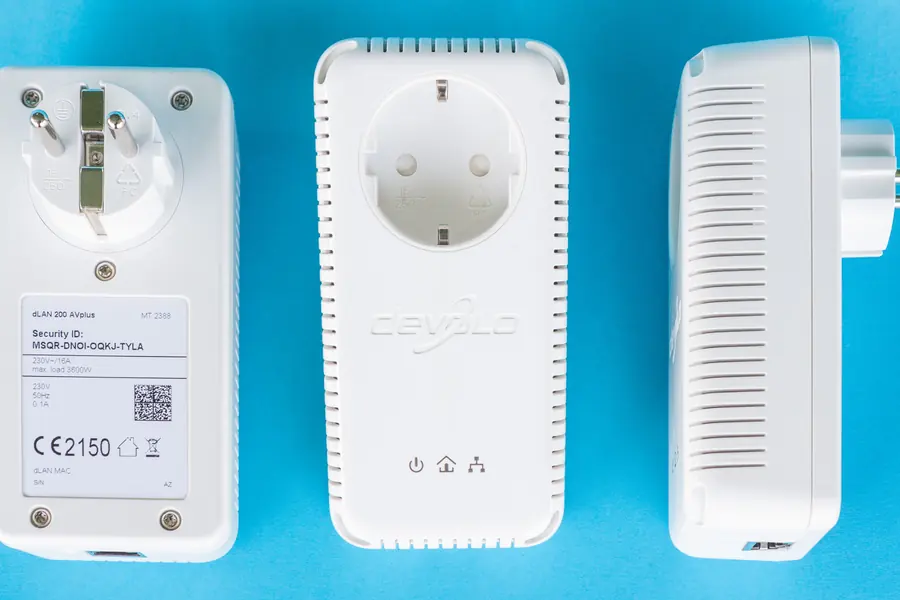
Do you need to bring internet to a distant room that wifi cannot reach and where a cable is hard to run? Powerline (PLC) adapters can be the solution, carrying the network over the existing electrical wiring in the house. Let us explain how they work, when they suit and where their limits are.
What powerline (PLC) is
Powerline is two small adapters that carry network data over the electrical wiring you already have in the house. You plug one into a socket near the router and connect it to the router with a cable, and you plug the other into a socket in the target room, with internet running from it to a computer or wifi point. So internet literally “flows” from the socket too.
Technically, the adapters add a high-frequency signal onto the electrical wiring that travels alongside the ordinary alternating current. Appliances do not notice it, but the second adapter can read it and turn it back into network data.
When it suits
Powerline makes sense where there is no ethernet cable and wifi cannot reach: through thick walls, to distant rooms, to the basement or the attic. It is an alternative to running cables and to a wifi repeater.
Advantages
- Simple to connect, it works almost right away.
- No running cables and cutting plaster.
- More stable than weak wifi at the other end of the house.
- Some models also have their own wifi, so they extend coverage right in the target room.
Disadvantages and limits
Here it is important to be realistic, because powerline is no miracle:
- Speed depends on the wiring. Old or poor-quality wiring significantly lowers the speed.
- Best on the same phase. Adapters are fastest on the same phase and circuit. Across phases they work too, but the signal weakens and the speed drops.
- Extension cords and filters interfere. Plug the adapter directly into a wall socket, not through an extension cord.
- The real speed is lower than the number on the box.
Standards and real speeds
Manufacturers print theoretical maximums on the box that you will never reach in practice. A rough overview:
| Standard | Number on the box | Real speed in practice |
|---|---|---|
| HomePlug AV | 200 to 500 Mbit/s | 20 to 90 Mbit/s |
| HomePlug AV2 | 1000 to 2000 Mbit/s | 100 to 400 Mbit/s |
| G.hn | 1000 to 2400 Mbit/s | 200 to 800 Mbit/s |
Real values depend on the quality and length of the wiring, the number of joints in the installation and interference from appliances. It is also important to buy both adapters with the same standard, ideally from one manufacturer, otherwise they will run only at their common minimum.
Step-by-step setup
- Plug the first adapter into a wall socket near the router and connect it with the supplied network cable to a free LAN port on the router.
- Plug the second adapter into the target room, again directly into a wall socket.
- Pair them: press the Pair button on the first adapter and within two minutes on the second one too. The adapters link up and the communication gets encrypted.
- Check the indicator lights. Most models show the link quality by colour: green means a good signal, orange a weaker one, red a bad one. With red, try another socket.
- Connect a device and measure the speed, so you know what to realistically expect from the link. The article on how much internet speed is enough will help.
Common mistakes and myths
- Myth: powerline speeds up the internet. It cannot carry more than your connection delivers. It only solves transporting the signal around the house, not the speed from your provider.
- Mistake: plugging into an extension cord. Surge protectors and filters in extension cords attenuate exactly the frequencies powerline needs. Always directly into the wall.
- Myth: the signal spreads freely to the neighbours. The electricity meter attenuates the signal heavily, in a family house it practically does not get out. In an apartment block it can partially carry over, so always pair the adapters, pairing encrypts the transmission.
- Mistake: mixing standards and manufacturers. Adapters of different generations either do not talk to each other or run at the speed of the older one.
- Myth: the adapters use a lot of power. Typical consumption is 2 to 4 W, and many models also have a power-saving mode when no data is being transferred.
When it does not work: troubleshooting
- The adapters will not pair. Do a factory reset (long press of the button) and try pairing them in two sockets of the same room. If that works, the problem is in the wiring between the rooms.
- Low speed. Try another socket in the same room, sometimes another circuit helps. Unplug chargers and switching power supplies in nearby sockets.
- Occasional dropouts. Look for a source of interference: old chargers, cheap LED drivers, a washing machine, a vacuum cleaner or a microwave can knock the signal down briefly. Switch appliances off one by one and watch when the link calms down.
- Nothing helps. The wiring is unsuitable for powerline. In that case mesh wifi or running a cable is the better path.
Powerline versus mesh versus cable
- A cable is always the most reliable and fastest.
- Mesh is best for covering the whole house with a wifi signal.
- Choose powerline when a cable cannot be run and wifi cannot reach there.
Practical tips
Plug the adapter directly into a wall socket, ideally on the same phase as the router, and test it first. With an old house, count on a lower speed.
More also in the article a home network: cable versus wifi.
Internet in every room without demolition
We will assess your electrical wiring and coverage and recommend whether powerline, mesh or a cable pays off in your home, including installation and setup. For homes and businesses in the Liptov region.
Get my network assessedThis article is part of our Computer networks overview.
Comments and questions 0
We keep the discussion to the point. Ads, links to other services, profanity and personal attacks will not be published. Neither will posts containing other people's personal data.
Frequently asked questions
What is a powerline (PLC) adapter?
What is the real speed of powerline adapters?
Do powerline adapters work across different phases?
Why should I not plug powerline into an extension cord?
Is powerline better than a wifi repeater?
Can a neighbour see into my network through powerline?
Need help with IT?
We will take care of your computers, networks and security - for businesses and households in the Liptov region.
Contact us