
An “Instagram” email about trademark infringement is a scam. Here is how we took it apart
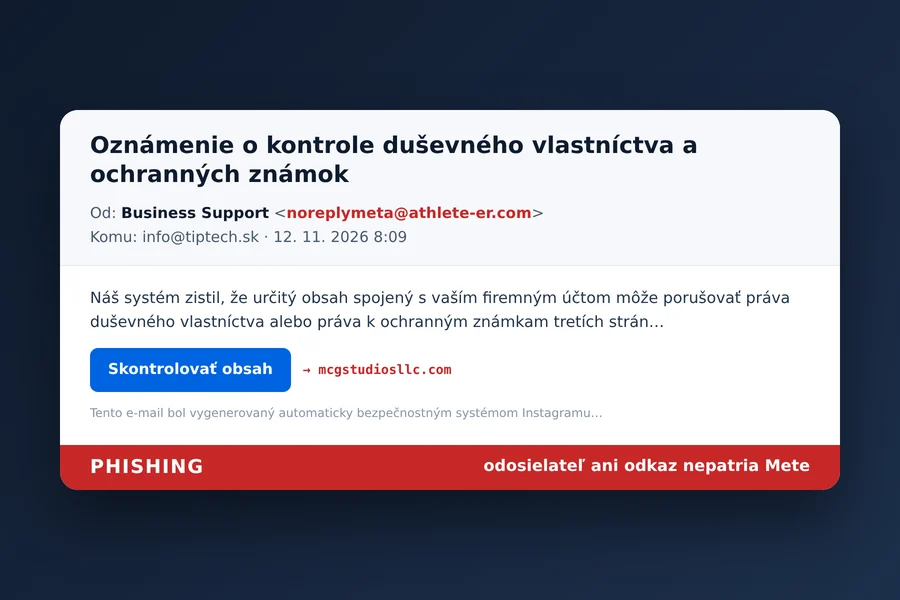
The email as it arrived at info@tiptech.sk on 12 November 2026. We left the link in the image as plain text only.
This morning at 8:09 an email arrived at our company address info@tiptech.sk with the subject “Intellectual property and trademark review notice” (in Slovak: „Oznámenie o kontrole duševného vlastníctva a ochranných známok“). The sender is called Business Support, there is a Meta logo at the top and an Instagram signature with Meta Platforms’ address in California at the bottom. All of it in flawless Slovak.
It says this:
Our system has detected that certain content associated with your business account may infringe the intellectual property or trademark rights of third parties. For this reason, the affected content is currently under review to ensure compliance with applicable policies.
It goes on to say this may concern pages, advertising campaigns and other business activities, and that if it is a mistake, we can request another review. That is what the only button in the email is for: “Review content”.
At first glance it asks for nothing, threatens no deletion and sets no deadline. That is exactly why this email is more dangerous than crude scams full of typos. But it is phishing, and its goal is to get into your Instagram account and through it to your business page and ads.
What the email gave away
The sender is not Meta. The address noreplymeta@athlete-er.com merely contains the word “meta”. Someone registered the domain athlete-er.com on 1 October 2026 with the German registrar IONOS. It has no website and no mail server, so you cannot even reply to it. The email loads the Meta logo straight from Facebook’s own server, so it looks completely genuine. According to its Help Center, Meta writes from the domains support.facebook.com, support.instagram.com, facebookmail.com, mail.instagram.com and global.metamail.com.
The message was sent by Amazon, not Instagram. The headers show that the email went out through Amazon SES from its Irish data centre. It is an ordinary bulk email service that anyone can pay for. That is why SPF and DKIM checks passed, but they only confirmed that Amazon really sent the message. They say nothing about who wrote it or whether it is true. We explain these checks in more detail in our article on securing company email with SPF, DKIM and DMARC.
The link leads to an unrelated website. The “Review content” button does not open instagram.com or facebook.com but the domain mcgstudiosllc.com, which has nothing to do with Meta. It was registered a year ago and expires in a few days. The page poses as Meta, its title reads “Security check in progress” in Slovak, and it immediately sends visitors further on. We did not go any further and we do not recommend you do either.
Our mail filter let it through this time. The message scored 4.68 out of 15 and landed in the inbox. The filter did notice that the sender’s domain has no mail server, but Amazon’s good reputation and the passed checks kept it below the spam threshold. With the recent domain name scam from a “Chinese registry” the filter had an easier job, with a score of 11.2. This email shows why you cannot rely on a filter completely.
Why “trademark infringement” of all things
Copyright and trademark complaints are a sensitive matter for businesses on social media. Instagram can restrict or block an account with several complaints. In September 2026 the security company Malwarebytes warned that scammers also abuse the genuine complaint system: they file fake reports, Instagram suspends the account, and they then ask the owner for money to withdraw the complaint.
An email like this one plays on the same fear, only more simply. There is nothing to report; it is enough to convince the person managing a business account to log in “just to be safe” and review the matter. The security company Cofense, for example, describes such campaigns: after the password, the fake page also asks for the two-factor authentication code, and the attacker uses it immediately. This bypasses the account protection and the attacker logs in before the code expires.
A business Instagram account matters for more than its posts. It is usually linked to a Facebook page and an ad account with a payment card on it.
How to check whether Instagram really wrote to you
Do not click the link in the email. Open the Instagram app or type instagram.com into your browser yourself.
Look at the list of emails from Instagram. In settings, in Accounts Center under password and security, there is a list of recent emails Instagram sent you in the last 14 days. Security messages are listed separately from the rest. If the email is not there, Instagram did not send it. Facebook offers the same check.
Check your account status directly in the app. Real restrictions and copyright complaints appear under account status in settings. If there is nothing there, there is nothing to deal with.
What to do with such an email
Mark it as spam and delete it. If you like, forward it to Instagram at phish@instagram.com first.
If you already clicked and entered your password, change it in the app right away, log out of other devices and check that no other email address or phone number has been added to the account. If you also entered a verification code, assume the attacker may have logged in. You will find a step-by-step guide in our article What to do when your account gets hacked.
Secure business accounts in advance. Two-factor authentication through an app is better than SMS, and security keys are best because they do not work on a fake page. We explain this in our article on two-factor authentication and backup codes. Add at least two admins to Business Manager so that losing one person’s access does not cost you the whole business page.
We summarised how to recognise phishing emails in general in the article Phishing: fraudulent emails.
Got a similar email and not sure about it?
Send it to us and we will look at the headers and the links and tell you who really sent it. We can also help secure your company’s social media accounts and set up your mail so that messages like this reach you as rarely as possible.
Get in touchVerification and sources. We base this on an email delivered to info@tiptech.sk on 12 November 2026 at 8:09. We verified its origin in the message headers and in our mail filter’s scoring, and the domain data in the public domain registry (RDAP). We opened the target page only to find out its title and entered nothing. We did not reply to the email. Checking emails and Meta’s addresses: Instagram Help Center. Abuse of copyright complaints: Malwarebytes, September 2026. Attacks on Meta business accounts: Cofense.
This article is part of the Cybersecurity overview.
Comments and questions 0
We keep the discussion to the point. Ads, links to other services, profanity and personal attacks will not be published. Neither will posts containing other people's personal data.
Frequently asked questions
I got an email from Instagram saying my content infringes trademarks. Is it real?
How do I find out whether an email really came from Instagram?
Which addresses do Instagram and Meta send email from?
The email passed SPF and DKIM checks. Does that not mean it is genuine?
I clicked the link and entered my login details. What now?
Where can I report such an email?
Need help with IT?
We will take care of your computers, networks and security - for businesses and households in the Liptov region.
Contact us